Amine tv is now available in an updated version for Android phones, Android TV boxes, and Google TV screens, and the installation process is very simple if you use the Downloader app. If you want a quick way to get Amine tv running on your TV or mobile device, all you need is the code, a few taps, and the app will be ready to use.
This latest version is focused mainly on open channels at the moment, including many Arabic channels, with more additions planned gradually over time. The app does not require an activation code right now, which makes setup much easier than many similar apps.
Table of Contents
- 📺 What is Amine tv?
- ⬇️ How to install Amine tv with Downloader
- 🛠️ What happens after installation?
- 📡 What channels are available right now?
- 🚀 What is expected in future updates?
- 📱 Devices supported by Amine tv
- 💬 Feedback and requested improvements
- ✅ Why this Amine tv update stands out
- ❓ FAQ
- 📝 Final notes
📺 What is Amine tv?
Amine tv is a streaming app designed to work on both phones and TV-based Android devices. It is compatible with:
- Android phones
- Android TV boxes
- Google TV devices
- Smart TV setups that support Android TV apps
The current version includes a large number of channels, with the strongest focus on open and free-to-access content. Arabic channels are a key part of the app’s offering in this stage.
The plan going forward is to expand the app gradually by adding more servers and more encrypted channel options later on. So even if the current version is centered on open channels, the idea is clearly to keep building it step by step.
⬇️ How to install Amine tv with Downloader
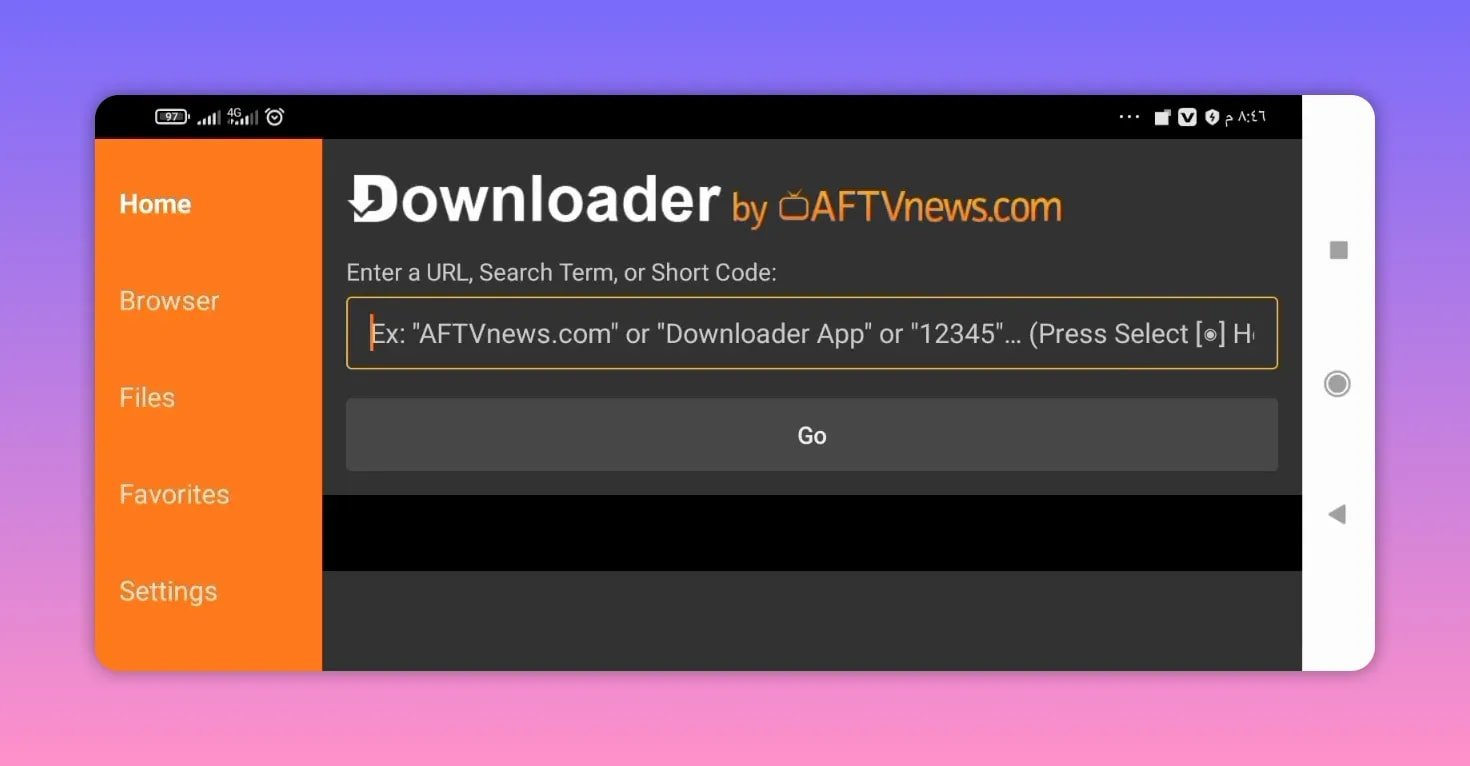
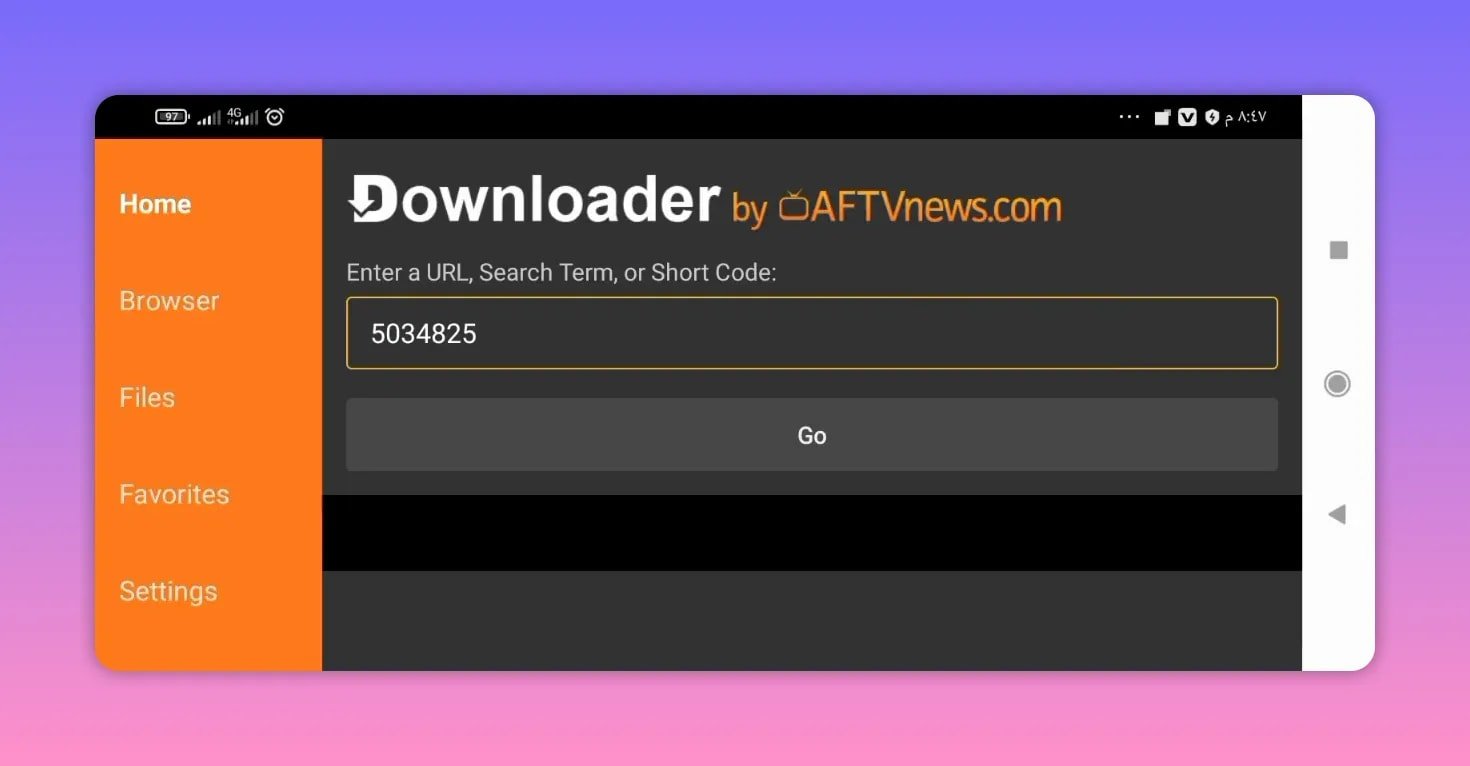
If you already use Downloader on Android TV or Google TV, installing Amine tv is straightforward. The app is delivered through a short numeric code that redirects to the download page.
Downloader code for Amine tv
Enter this code inside the Downloader app:
5034825
Step-by-step installation
- Open the Downloader app on your device.
- In the URL or code field, enter 5034825.
- Press Go.
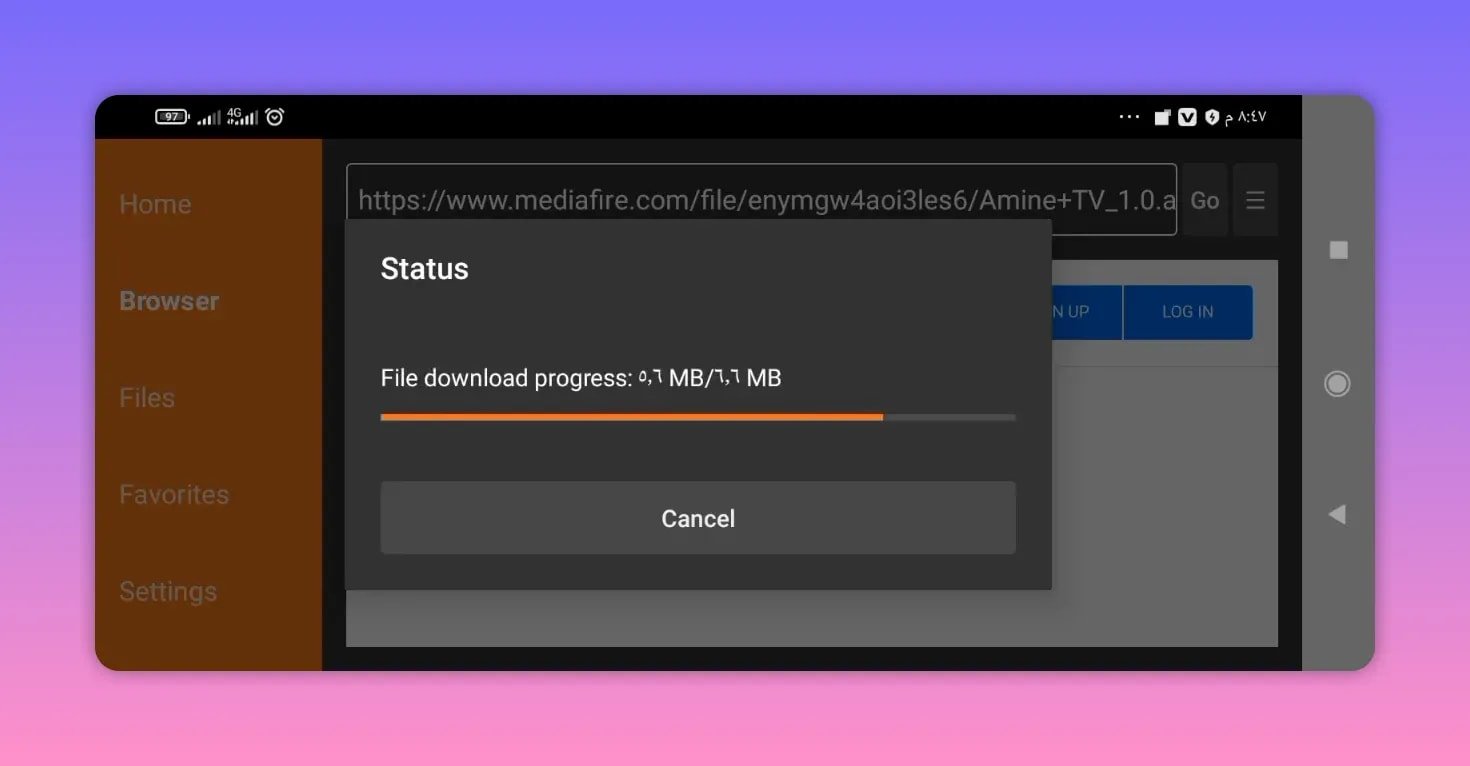
- Wait a few seconds for the redirect to load.
- Scroll down on the page if needed.
- You will be taken to a MediaFire file download page.
- Select the Amine tv app file.
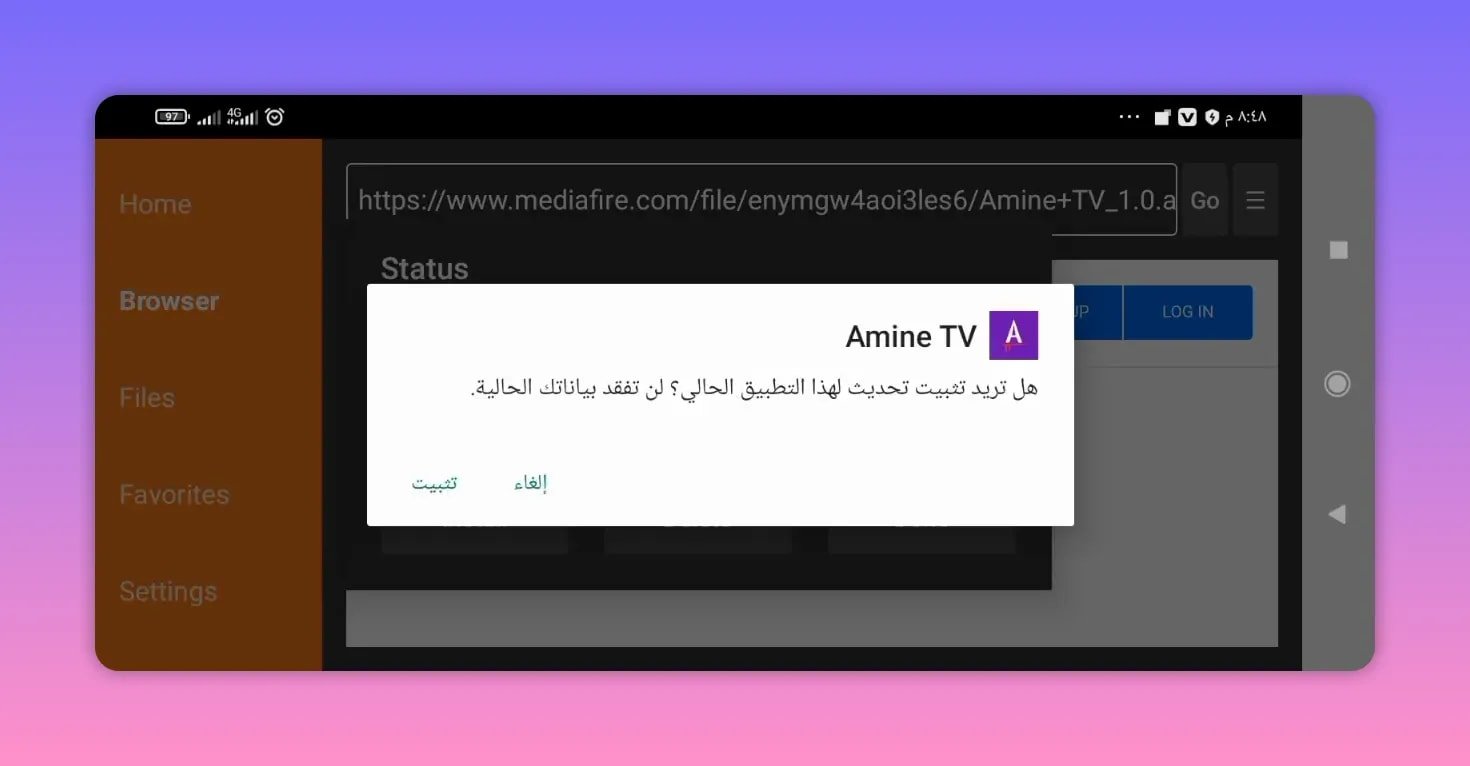
- Download and install the APK.
That is all you need to do. Once the installation finishes, Amine tv should be ready to launch.
🛠️ What happens after installation?
One of the best things about the current Amine tv release is that it does not need an activation code. As soon as you install it, the app works directly.
That makes it especially convenient for anyone who prefers a simple setup process without extra login steps, changing codes, or manual activation.
If you have used similar Android TV apps before, you already know that some require a separate code after installation. Here, the process is much easier in the current version.
If you enjoy installing TV apps this way, you can also check this related guide on installing a streaming app on Smart TV and phone, which follows a similar Downloader-based workflow.
📡 What channels are available right now?
At this stage, Amine tv includes:
- Many open channels
- A strong selection of Arabic channels
- A working version ready for phone and TV use
The app is not presented as a finished static package. It is being built up over time, and more channel sources are expected to be added progressively.
This gradual rollout matters because it sets the right expectation. The current version is already usable and functional, but the bigger content expansion is planned through future server additions.
🚀 What is expected in future updates?
The update path for Amine tv is clear. More servers will be added progressively, and with them, more encrypted channels are expected to become available later.
In practical terms, that means the app is intended to grow in stages rather than all at once. The stated direction includes:
- Adding servers gradually
- Expanding channel availability over time
- Introducing more encrypted channel support later
This kind of staged expansion is common in Android TV app ecosystems, especially when an app begins with a stable base of open channels and then builds upward. If you want more app options in the same space, the Android TV app category here is a useful place to explore similar installation guides.
📱 Devices supported by Amine tv
Amine tv is meant to work across multiple Android-based environments, not just one screen type. Based on the current release, it supports:
- Android phones for mobile use
- Android TV boxes for living room streaming
- Google TV screens and devices for a TV-friendly experience
This flexible support makes the app useful for anyone who wants the same channel app across more than one device without learning a different setup every time.
💬 Feedback and requested improvements
An important part of the app’s direction is user feedback. Suggestions, impressions, and requested changes are clearly welcomed. That means Amine tv is being treated as an evolving app, not a one-time release.
The most useful kinds of feedback usually include:
- Which channels work best
- Which categories should be added first
- Whether the TV interface feels smooth
- Any installation or playback issues
- What improvements are needed for future updates
That kind of feedback is especially valuable when an app is gradually adding servers and expanding content.
✅ Why this Amine tv update stands out
There are three practical reasons this version of Amine tv stands out:
- Easy installation through a Downloader code
- No activation code needed in the current version
- Support for both mobile and TV devices
That combination makes it appealing for anyone who wants a simple setup and immediate access to a broad set of open channels without extra complications.
For people comparing app installation methods, another related example is this guide to installing Abdo Plus with Downloader code, which is useful for understanding how similar Android TV app delivery works.
❓ FAQ
What is the Downloader code for Amine tv?
The Downloader code for Amine tv is 5034825.
Does Amine tv require an activation code?
No. The current version of Amine tv does not require an activation code. After installation, it should work directly.
Where does the Downloader code lead?
After entering the code and pressing Go, the process redirects to a MediaFire download page where you can select the Amine tv app file and install it.
What kind of channels does Amine tv currently include?
At the moment, Amine tv mainly includes many open channels, including a good number of Arabic channels.
Will more channels be added later?
Yes. More servers and more encrypted channels are planned to be added gradually in future updates.
Can I use Amine tv on Android TV and Google TV?
Yes. Amine tv is intended to work on Android phones, Android TV boxes, and Google TV devices.
Is Amine tv only for TV devices?
No. Amine tv also works on Android phones, in addition to TV-based Android devices.
📝 Final notes
If you want a lightweight and easy way to get Amine tv installed on Android TV, Google TV, or phone, this update keeps things simple. Enter the code 5034825, follow the MediaFire download page, install the app, and start using it immediately.
Right now, the main strength of Amine tv is its collection of open channels and Arabic channel availability, with a clear promise of gradual improvement through future server additions. For anyone who values easy setup and direct access, this version is a strong starting point.